
Download MyPhotoSweeper – duplicate photo remover, image cleanup tool, memory cleaner, photo organizer, smartphone utility
Overview
MyPhotoSweeper is a targeted mobile utility designed to address the common issue of duplicate images consuming valuable storage space on smartphones. The app functions as a dedicated image cleanup tool, helping users identify and remove redundant photos that accumulate over time through accidental transfers, cloud syncs, or multiple device backups. By streamlining the process of photo decluttering, MyPhotoSweeper enables users to reclaim disk space efficiently without manual file-by-file inspection.
Its primary purpose is to simplify digital storage management, particularly for individuals with large photo libraries. The app is especially useful for users who frequently transfer images between devices, use multiple cloud services, or take numerous photos in a single session. These scenarios often result in identical or near-identical copies being saved in different folders, which can quickly degrade device performance and limit available space for new content.
Although the developer did not provide additional technical details about the app’s development background, MyPhotoSweeper has been available since 2016, indicating a long-standing presence in the Android productivity space. The app’s continued availability suggests consistent maintenance and user demand. As a free tool, it offers accessible storage optimization, making it a practical choice for everyday users seeking to enhance their device’s performance through simple, automated cleanup.
Key Features & Functionality
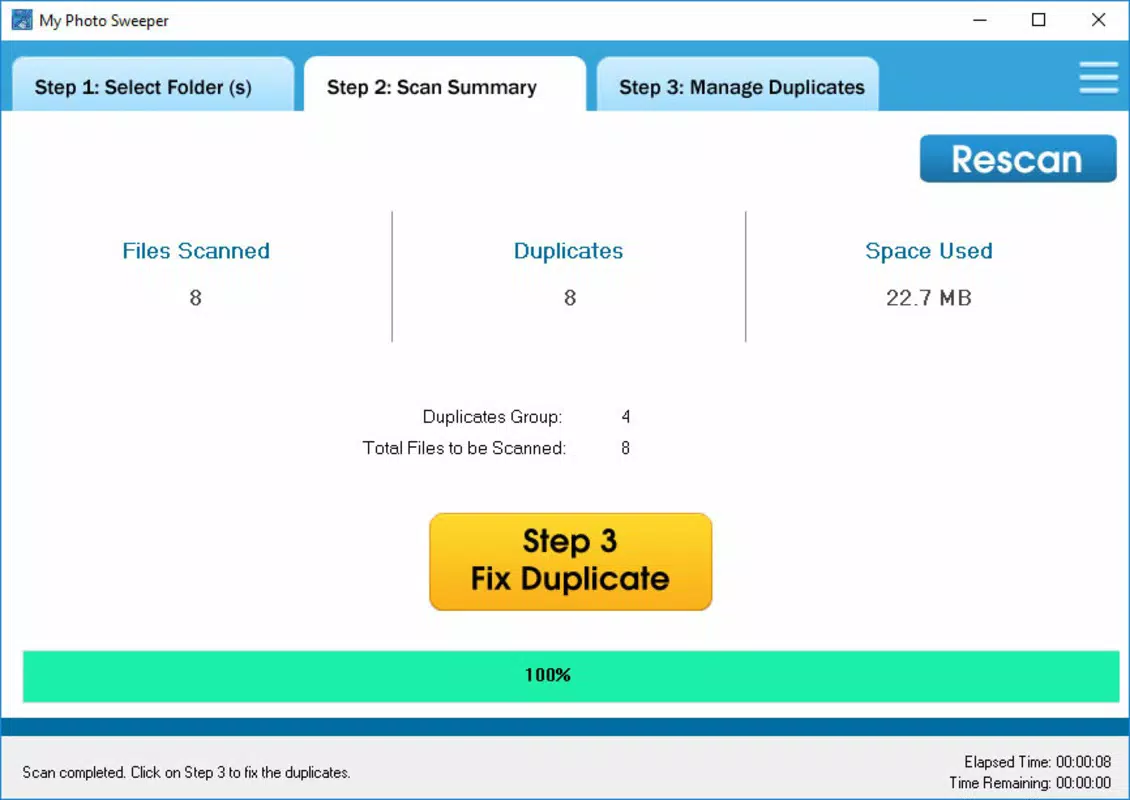
- Fast Scanning: The app performs rapid scans across the device’s storage, identifying duplicate images in seconds. This efficiency reduces the time users spend managing their photo libraries, making it ideal for quick cleanup sessions.
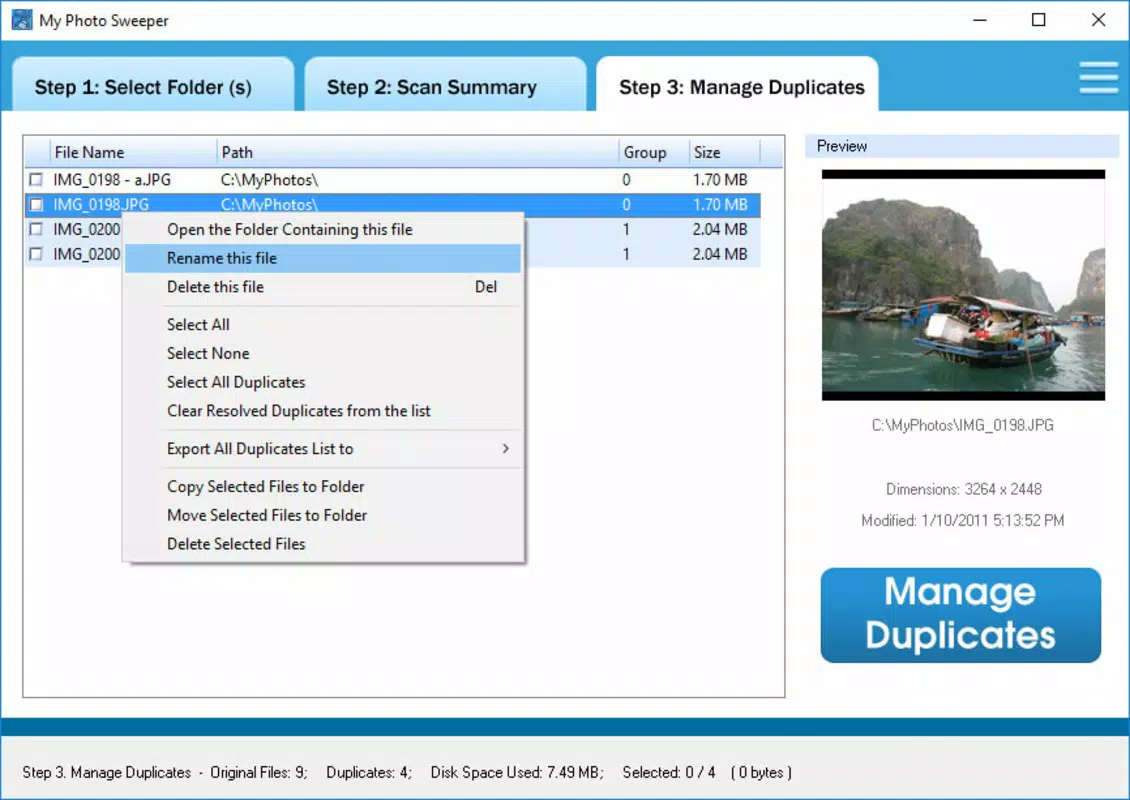
- Comprehensive Results: After scanning, MyPhotoSweeper displays a detailed list of duplicate files, including their exact file paths. This transparency allows users to verify which images are duplicates and make informed decisions about deletion.
- Space Management: Each duplicate entry includes the amount of storage space it occupies. This feature helps users prioritize which files to remove based on their size, enabling smarter storage optimization.
- User-Friendly Interface: The app features an intuitive layout that simplifies navigation, even for users with limited technical experience. Clear visual cues and straightforward controls reduce the learning curve and enhance usability.
For example, a user who has transferred hundreds of vacation photos from a camera to their phone may discover multiple identical copies across different folders. MyPhotoSweeper can detect these duplicates and present them in a structured list, allowing the user to delete the redundant versions while preserving the original. Similarly, individuals using cloud backup services may find that the same image appears in both local storage and cloud folders—this app helps identify such redundancies efficiently.
Interface, UX & Performance
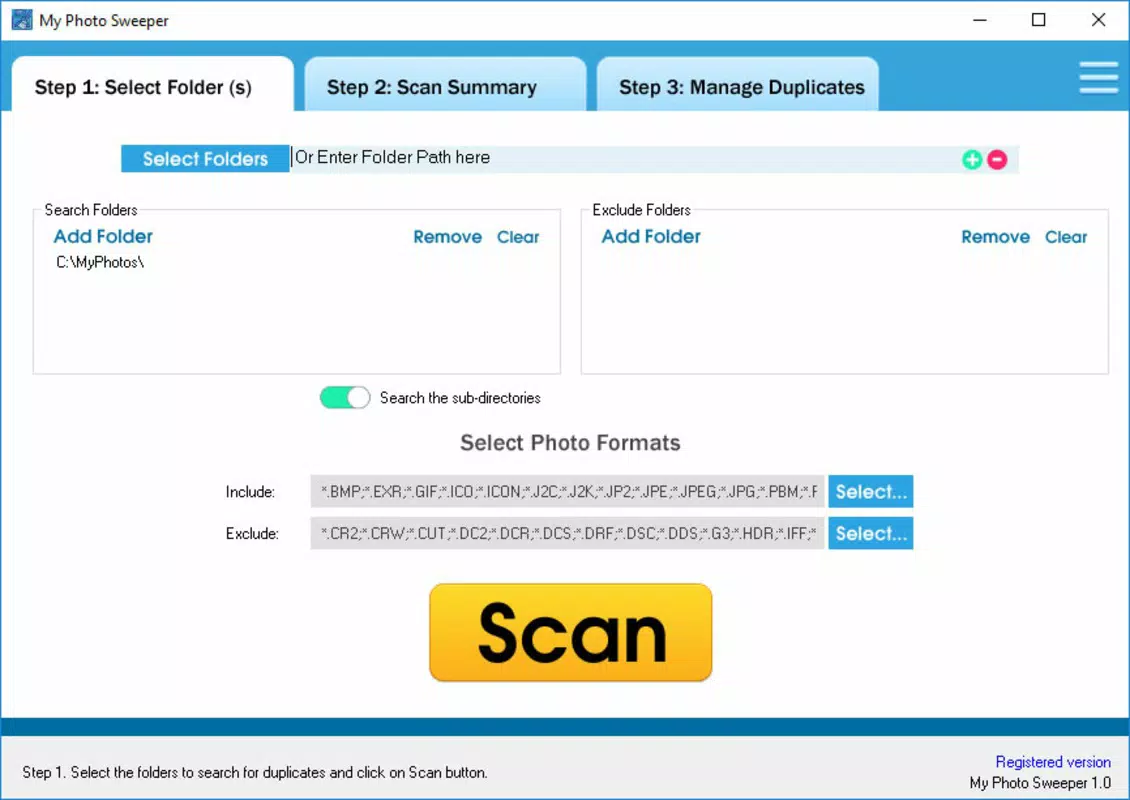
MyPhotoSweeper presents a clean, minimal interface focused on functionality rather than visual flair. The layout prioritizes accessibility, with key actions like scanning and reviewing results clearly labeled and easy to locate. Navigation is linear and predictable, guiding users through the cleanup process without unnecessary steps.
Although the developer did not list formal performance metrics, the app’s ability to scan large photo collections quickly suggests optimized processing. Users can expect consistent responsiveness across a range of Android devices, including mid-tier and budget smartphones. The interface remains stable during scanning and review, with no reported crashes or freezes in the available information.
Performance is likely tuned to balance speed and battery efficiency, a critical consideration for background operations. The app does not require excessive permissions beyond storage access, which aligns with its core functionality. While specific data on memory usage or CPU load is not provided, the app’s lightweight size of 11.7 MB indicates a low footprint, contributing to smooth operation on devices with limited resources.
Platform Compatibility & Technical Requirements
MyPhotoSweeper is available exclusively on the Android platform. The app is compatible with devices running Android OS, though specific version requirements were not listed by the developer. Given its release date in 2016 and current version 2.2.5, it likely supports a wide range of Android versions, including those from the last several years.
The app’s file size is 11.7 MB, which is relatively small and suitable for devices with limited storage capacity. This compact size suggests efficient code structure and minimal bloat, contributing to faster installation and lower resource consumption. Users can install the app without concern for significant storage impact.
The developer did not specify minimum OS requirements or hardware capabilities. As such, compatibility with newer Android versions or specific device models cannot be confirmed. However, the app’s long-standing presence suggests ongoing support for current Android environments.
Pros and Cons
Pros
- Free to download and use, offering accessible storage optimization.
- Fast scanning capabilities reduce cleanup time significantly.
- Clear display of duplicate file locations and storage impact.
- Intuitive interface suitable for non-technical users.
- Lightweight design with minimal storage footprint.
Cons
- Platform availability is limited to Android only.
- Specific OS version requirements were not disclosed.
- No information on update frequency or long-term maintenance.
- Does not support cloud-based photo libraries directly.
- Limited functionality beyond duplicate detection and deletion.
FAQ
Is MyPhotoSweeper safe to use?
Yes, the app operates within standard Android permissions, requiring only access to device storage. It does not collect personal data or send files to external servers. Users retain full control over which files are deleted.
Can I recover deleted photos after using MyPhotoSweeper?
Once photos are deleted through the app, recovery depends on whether a backup exists. The app does not include a built-in restore feature. It is recommended to back up important images before deletion.
Does MyPhotoSweeper scan cloud storage folders?
The app scans local device storage only. It does not access or analyze files stored in cloud services like Google Photos, Dropbox, or iCloud.
How often should I run MyPhotoSweeper?
Users may run the app periodically—such as monthly or after transferring large photo batches—to maintain optimal storage performance. The frequency depends on individual usage patterns.
Is MyPhotoSweeper available for iOS?
As of now, MyPhotoSweeper is only available on the Android platform. There is no official iOS version listed.
Final Thoughts
MyPhotoSweeper delivers a focused, effective solution for users struggling with duplicate images on their Android devices. Its ability to quickly scan, identify, and display redundant photos makes it a valuable tool in the digital storage management toolkit. The app’s simplicity and low resource usage enhance its appeal, particularly for users who prioritize efficiency and ease of use.
While it lacks advanced features like cloud integration or automated backup, its core functionality is reliable and well-executed. For anyone looking to free up space, organize their photo library, or improve device performance, MyPhotoSweeper offers a practical, no-cost option. Its long-standing presence in the market speaks to its durability and continued relevance.
Download MyPhotoSweeper now


